Home Tools
Timekeeper Receipt Capture Scheduler Job Photos Field Estimating CFO Dashboard
Pricing Compare
vs Jobber vs Housecall Pro vs ServiceTitan vs FieldPulse vs Contractor Foreman vs JobTread
How It Works About Learn Get Started
Six Tools • 20 Users • $69/mo

Field Service Software.
Real Numbers. Better Decisions.

Six tools that put clean financial data in front of you — job profitability, cost centers, business segments — so you know when to hire, when to buy, and when to hold. 20 users. $69/month.

Field Activity
Clean Books
CFO Dashboard
Better Decisions
QuickBooks Online Integration
US-Based Support
No App Install Required
Built by a Bookkeeper

Your Books Should Tell You More Than Your Tax Bill

Most contractors find out if a job made money after it's over. By the time your accountant or bookkeeper tells you a job lost money, you've already moved on to the next three. You can't fix what you can't see.

Here's what that looks like: Your crew bids a job at $45,000. Three weeks in, you've spent $38,000 on labor, materials, and subs — but you're only 60% done. That's a $7,500 problem, and you won't know about it until the invoice goes out and the books close.

One job like that can wipe out your profit on the next two.

$7,500
Hidden overrun on a single $45K job
You won't know until the books close.

What's Bad Data Costing You?

$59,400
per year — that's what a 5-job/month contractor could lose from untracked overruns
Calculate your number →

Six Tools. One Price. Zero Learning Curve.

Every tool runs in a phone browser. No app store. No downloads. Your crew is up and running in minutes.

Timekeeper

Know exactly where your crew is, what they're working on, and what it's costing you — before payroll.

  1. Crew opens their phone browser and taps Clock In. GPS confirms the jobsite.
  2. Assign employees to jobs. Track labor burden and overtime in real time.
  3. Export payroll-ready data. Review hours before they hit your books.
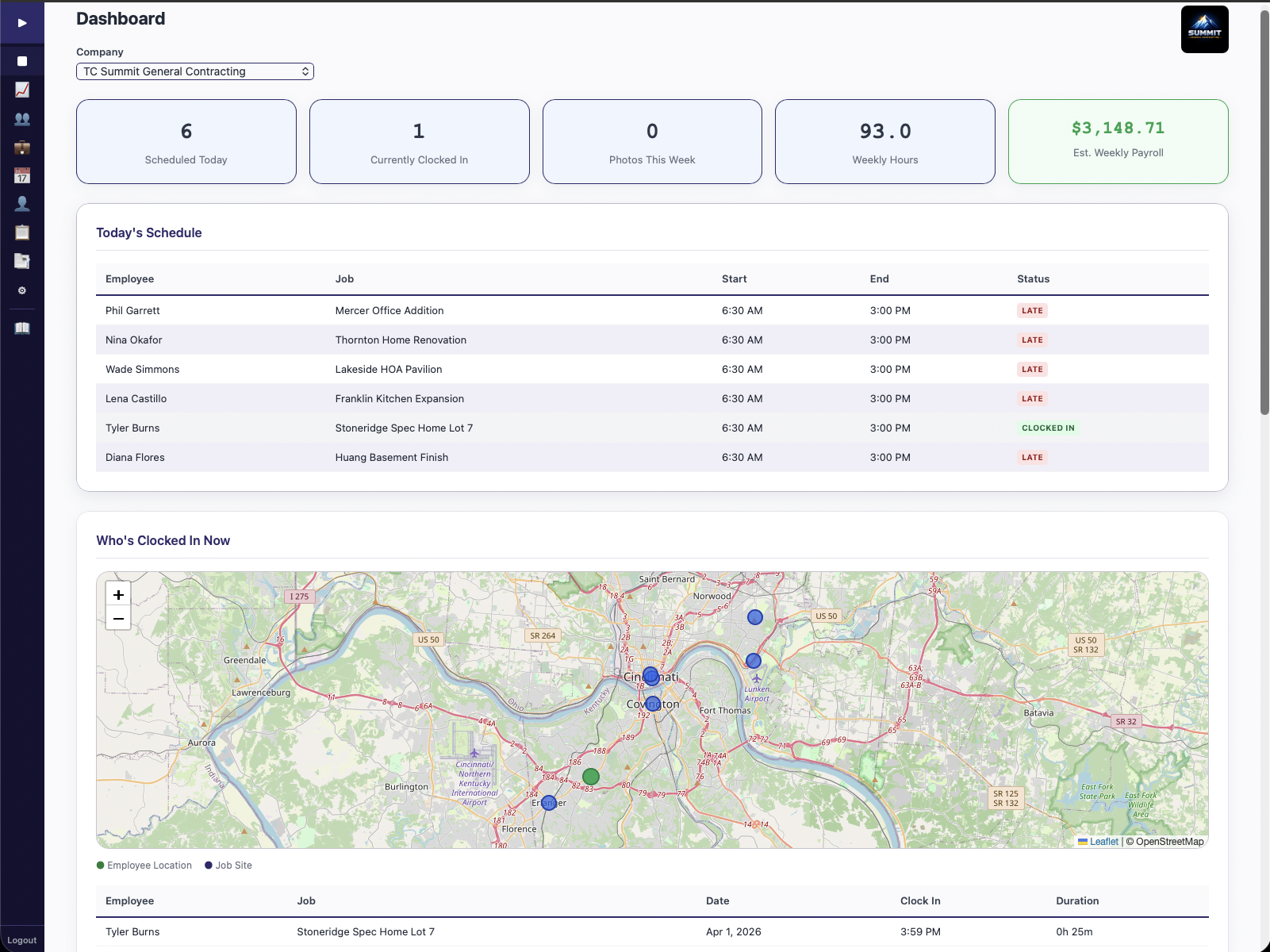
Admin dashboard with today's schedule, GPS map, and payroll estimate

Receipt Capture

Stop losing money between the field and the books. Photo or email a receipt — AI handles the rest.

  1. Snap a photo or add a voice memo. Forward email receipts to your BDB inbox.
  2. AI transcribes, categorizes, and assigns the expense to the right job.
  3. The expense syncs to QuickBooks Online as a Purchase with vendor, account, and category mapping.
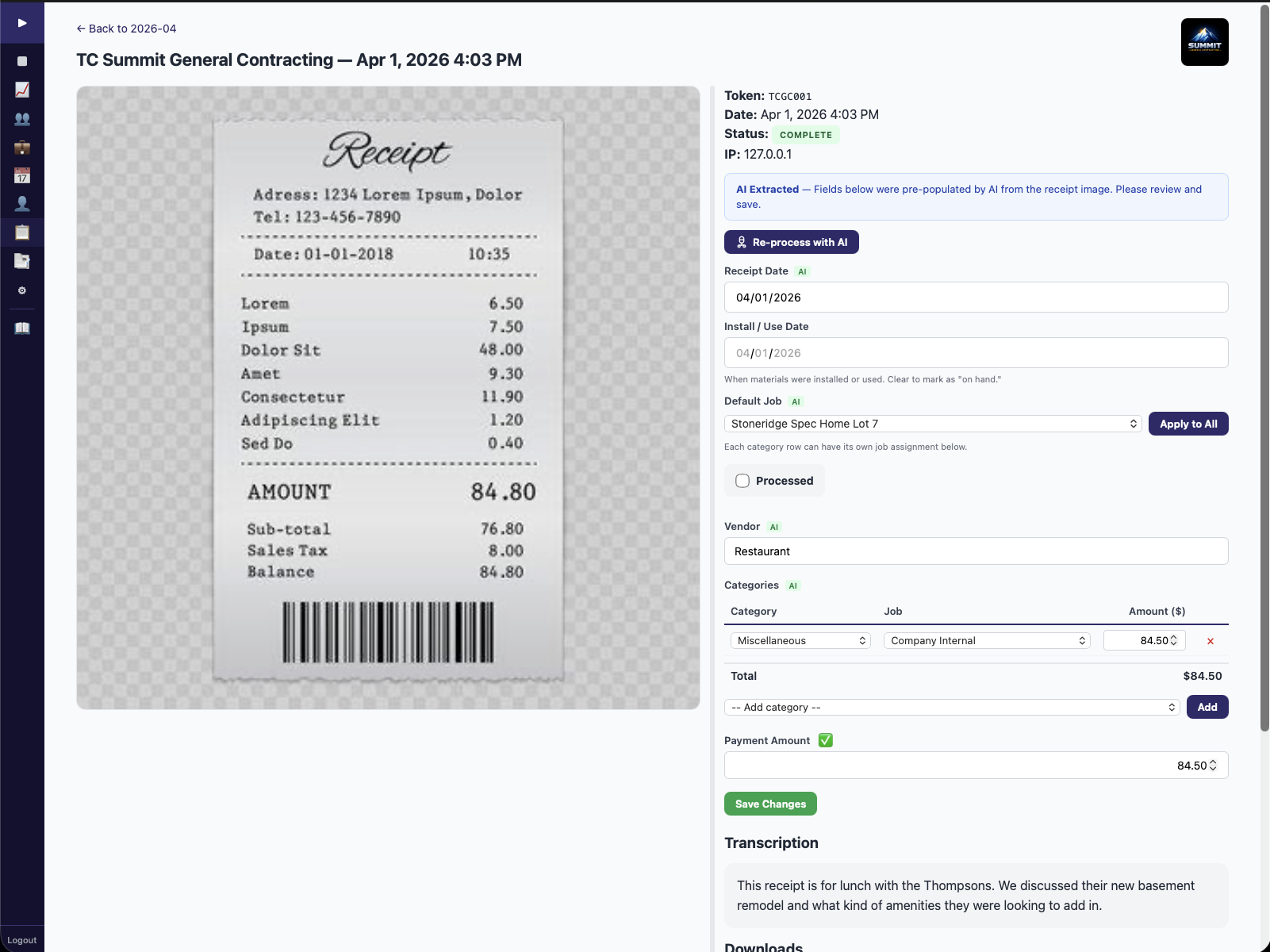
Receipt detail with AI-extracted fields, job assignment, and QBO sync

Scheduler

Set up a recurring job once. Scheduling handles itself. Drag, drop, done.

  1. Drag and drop to build your schedule. Create Work Orders with recurrence patterns.
  2. Employee schedules generate automatically. Pause and resume anytime.
  3. Crew sees their schedule on their phone. Push notifications remind them of upcoming jobs.
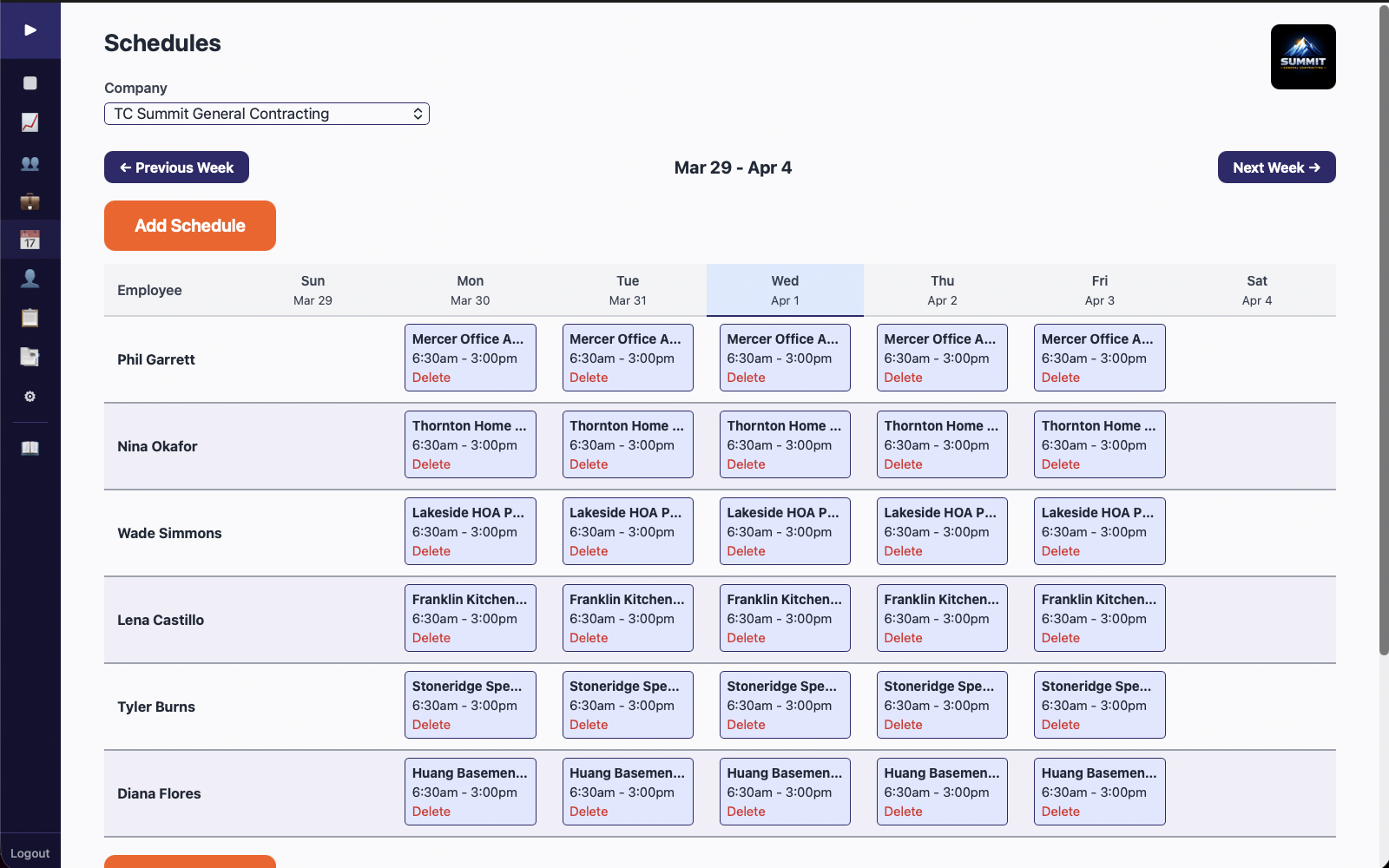
Weekly employee schedule grid with all crew assignments

Job Photos

Every photo organized, geotagged, and sorted — without you doing anything.

  1. Take a photo or record video on the jobsite. GPS and timestamp are embedded automatically.
  2. AI classifies each photo into 25+ folder categories (before/after, progress, safety, etc.).
  3. Generate AI-powered PDF jobsite reports with one click. Ready for clients or disputes.
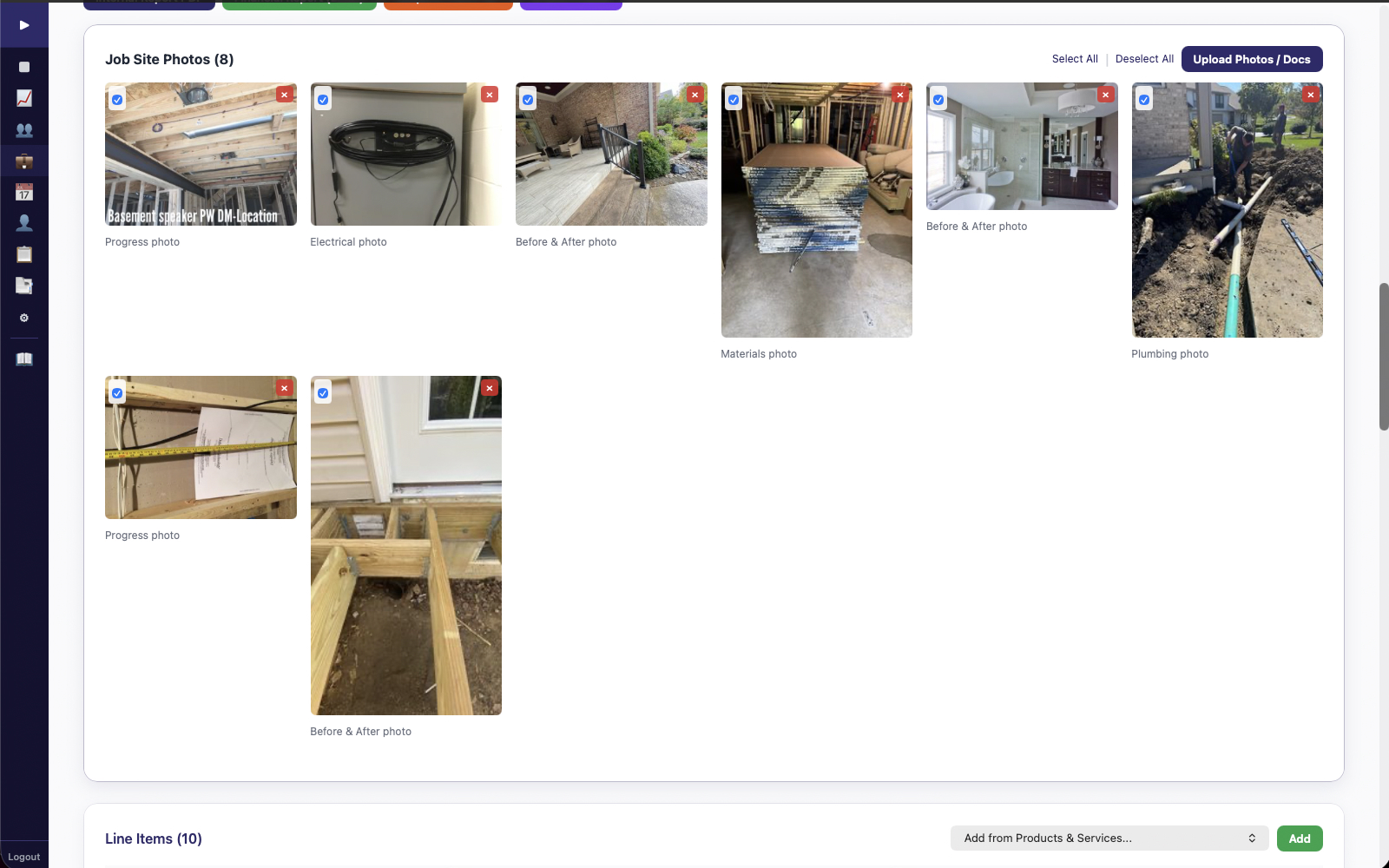
Job site photos with AI classification labels organized by category

Field Estimating

Capture an estimate on-site with your voice. AI does the rest — line items, pricing, and approval tracking.

  1. Record a voice memo describing the job scope, materials, and labor.
  2. AI transcribes your memo and extracts tasks, quantities, and line items.
  3. Review, adjust, and send for approval. Track financial status and lead sources for marketing ROI.
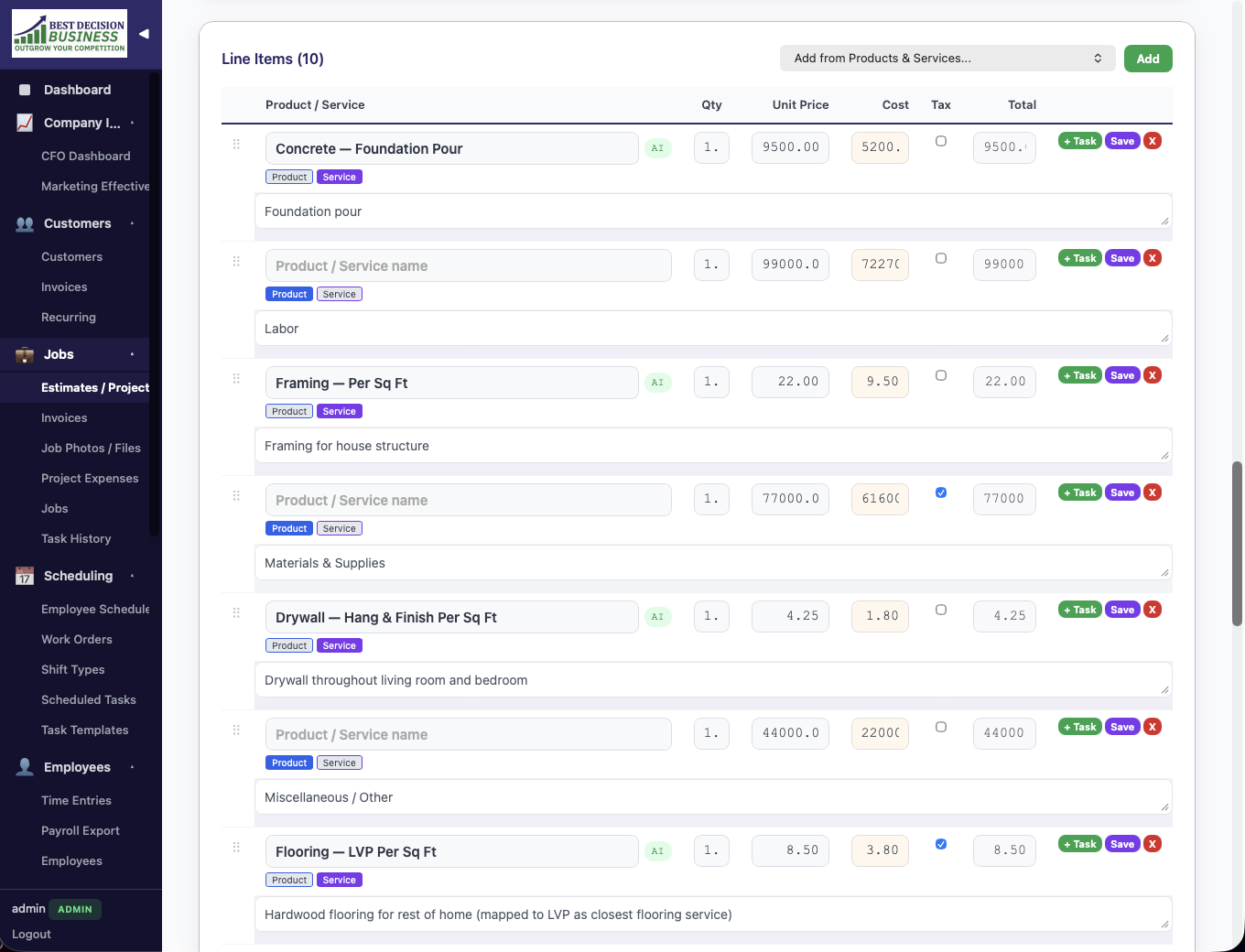
Estimate line items with products, quantities, and pricing detail

CFO Dashboard

Know if a job is profitable before it's too late to fix it. Live KPIs, health gauges, and financial education built in.

  1. All field data flows into live KPIs: revenue, margins, WIP (work in progress), and cash position.
  2. Health gauges turn red/yellow/green so you spot problems at a glance.
  3. A 3-tier education system (Starter, Intermediate, Full CFO) grows with you — not a paywall, a learning path.
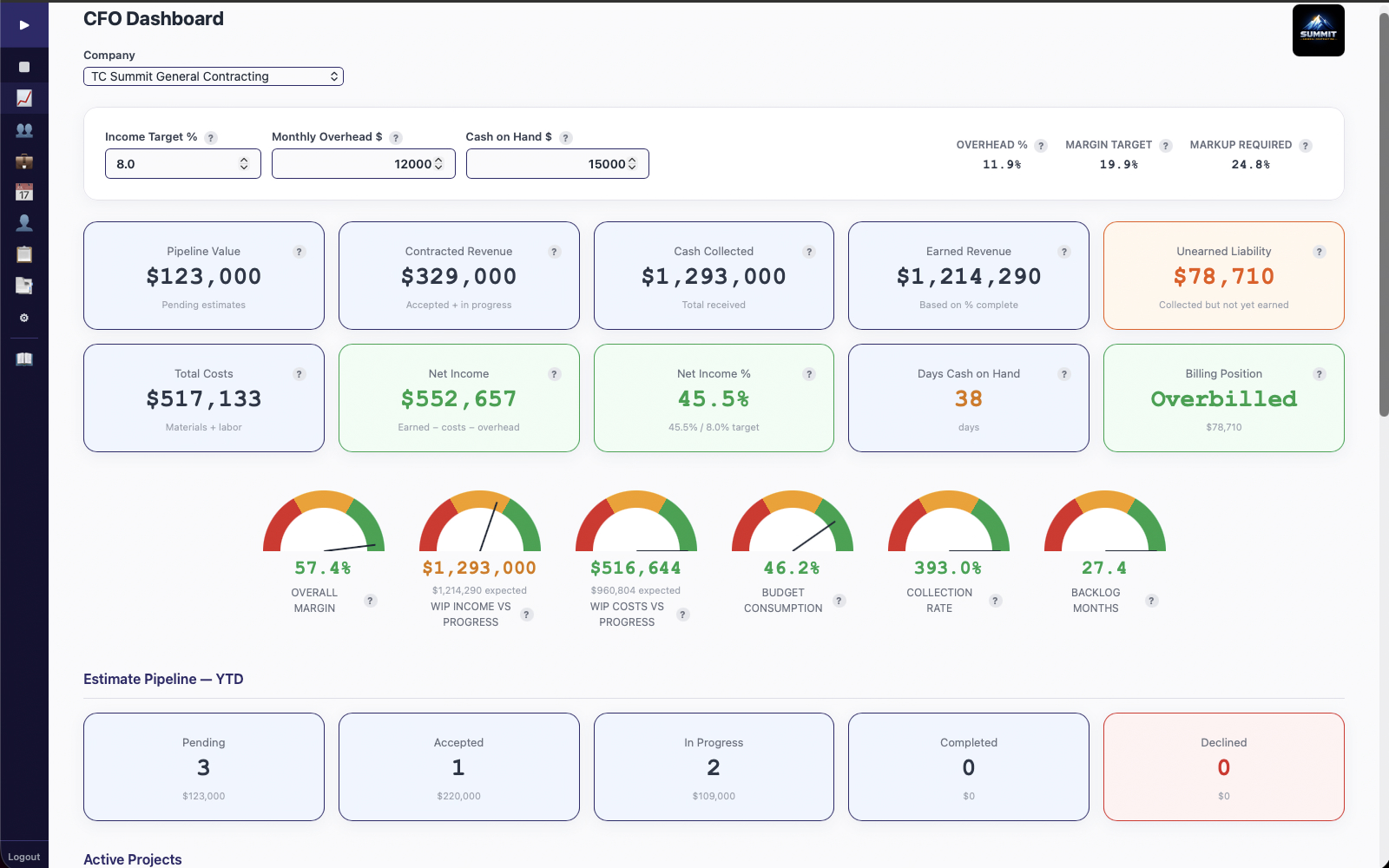
CFO Dashboard with live KPIs and health gauges

Tap a card to see how it works

A Real Product, Not a Pitch Deck

BDB Project Tools is live, production-ready, and being used in the field today.

BDB Project Tools — Full Product Walkthrough

See all screenshots and the full walkthrough →

Retail $149/mo

$69/mo

Founder's Pricing — 20 users included. All features. No contracts. $5/seat for additional users beyond 20.

Founder's Pricing available through June 30, 2026. Sign up before then and your $69/mo rate is locked. We don't raise prices on existing subscribers.

Or included with bookkeeping and fractional CFO services starting at $495/mo

See Full Pricing

What Contractors Are Saying

★★★★★
"I was paying Jobber about $380 a month for my 7-man crew. Switched to BDB, got more features, full QuickBooks sync, and I'm paying $69. I don't know why anyone wouldn't make that switch."
Bob S.General Contractor, Cincinnati OH
★★★★★
"I used to have a box of receipts in my truck. Now I take a photo, say what it's for, and it shows up on the right job with the right category. My bookkeeper thinks I finally got organized — it's just the app."
Paul C.General Contractor, Columbus OH
★★★★★
"My guys aren't tech people. They're electricians. But they picked up the clock-in and receipt photo thing on day one — no app to download, just open the browser. Zero training headaches."
Tristan C.Electrician, Florence KY

Switching from Jobber, Housecall Pro, or ServiceTitan?

You Started as a Tradesperson. Now You're Running a Business.

Your Tools Should Reflect That.

Start with the software. Get visibility into your numbers. Grow into cleaner books. Scale into deeper financial control. BDB Project Tools was built to close the gap between where you are and where you're headed — six field tools, full QuickBooks integration, and a CFO dashboard that grows with you.