See Job Photos in Action
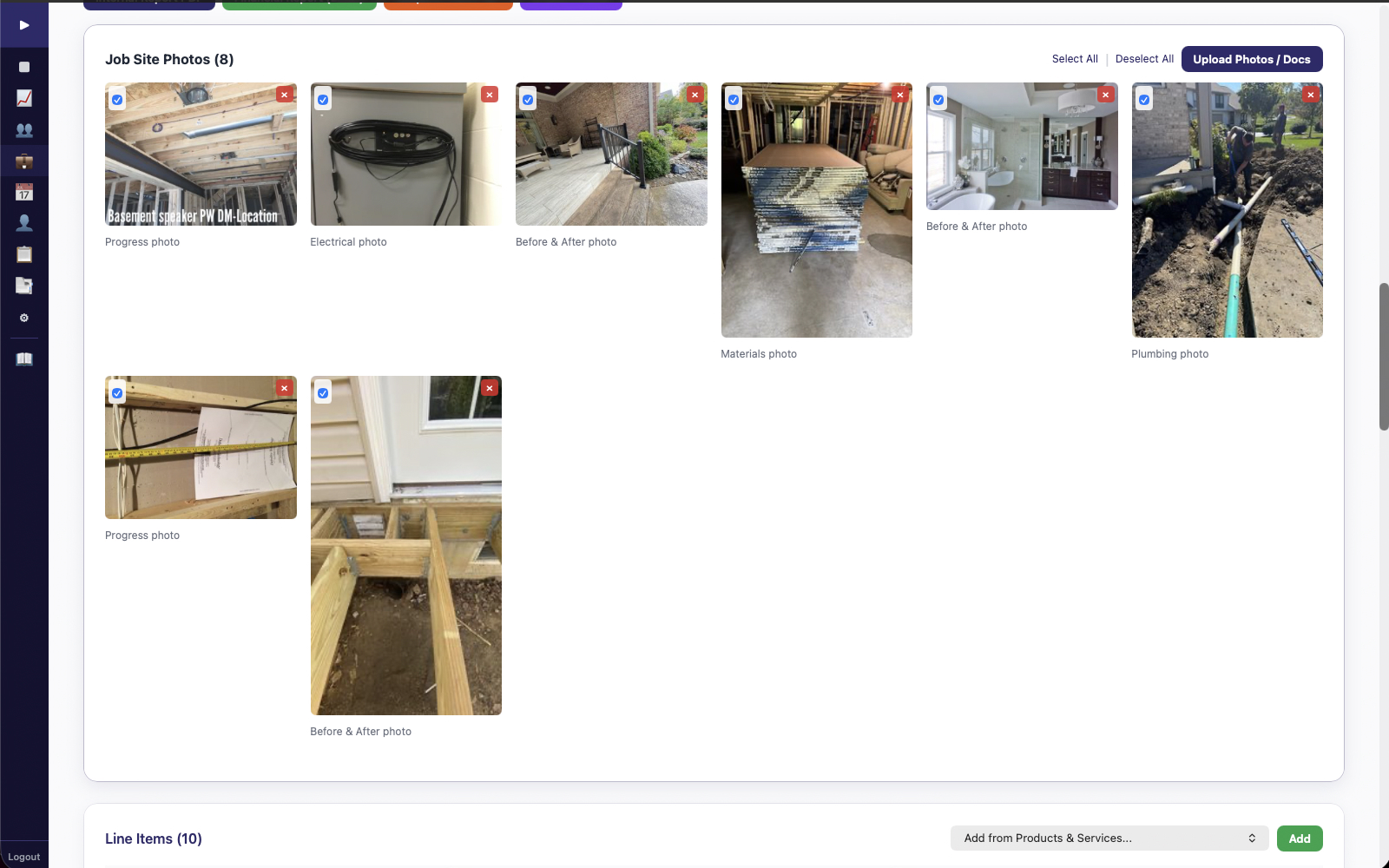
AI classifies your jobsite photos into 25+ folder categories automatically. Record video, generate PDF reports, and have a visual record of every job — organized and searchable.
Your crew takes 50 photos a week across 8 jobsites. They sit unsorted in someone's camera roll. When a client disputes the scope of work or a subcontractor denies damage, you're scrolling through thousands of unorganized photos trying to find proof.
That's hours of your time — or worse, a dispute you lose because you can't produce the right photo fast enough. One lost dispute on a $35,000 job can cost you $5,000-$10,000 in rework or concessions. That's 7-12 years of BDB subscriptions lost on a single undocumented claim.
From shutter click to organized documentation — AI handles the filing so your crew doesn't have to.
Open BDB in your phone browser — no app to install. Take photos or record video right on the jobsite. GPS coordinates and timestamps are embedded automatically with every capture.
AI analyzes each image and sorts it into 25+ folder categories — before/after, progress, safety, materials, damage, electrical, plumbing, HVAC, and more. No manual tagging. No folder hunting.
With one click, generate AI-powered PDF reports with selected photos, timestamps, and GPS data. Professional documentation ready for clients, insurance claims, or dispute resolution.
Photos are classified automatically. No manual tagging required.
Competitors either ignore jobsite photos entirely or give you a basic gallery with no organization. BDB gives you an AI-powered documentation system.
Photos are automatically sorted into categories like before/after, progress, safety hazards, materials on-site, damage documentation, and more. No manual tagging required.
Every photo includes embedded GPS coordinates and a timestamp. Prove exactly where and when a photo was taken — critical for insurance, disputes, and compliance.
Sometimes a photo isn't enough. Record video walkthroughs of jobsites directly from your browser. Document conditions, narrate findings, capture the full picture.
Turn your photos into professional PDF reports with timestamps, location data, and AI-written descriptions. Send to clients, adjusters, or keep for your records.
Photo classification runs on BDB's servers using local AI models. Your jobsite photos never get sent to third-party AI services. No data leaves the system.
Works from any phone browser — iPhone or Android. Your crew opens a link and starts capturing. No app store downloads, no updates, no storage headaches.
Job photos provide visual documentation that supports job costing accuracy. Photo evidence of materials and conditions helps resolve billing disputes and validates expense claims that sync to QuickBooks Online through Receipt Capture.
When a receipt is captured and synced to QBO, the corresponding jobsite photos back up the claim. When a client questions an invoice line item, you have timestamped, geotagged proof of the work performed — organized and ready to present.
Every photo your crew takes is organized, geotagged, and searchable — automatically. Six tools, 20 users, $69/month. Founder's rate locked when you sign up before June 30, 2026.
Founder's Pricing: $69/mo for 20 users. Retail $149/mo. Founder's rate locked when you sign up before June 30, 2026.