See Receipt Capture in Action
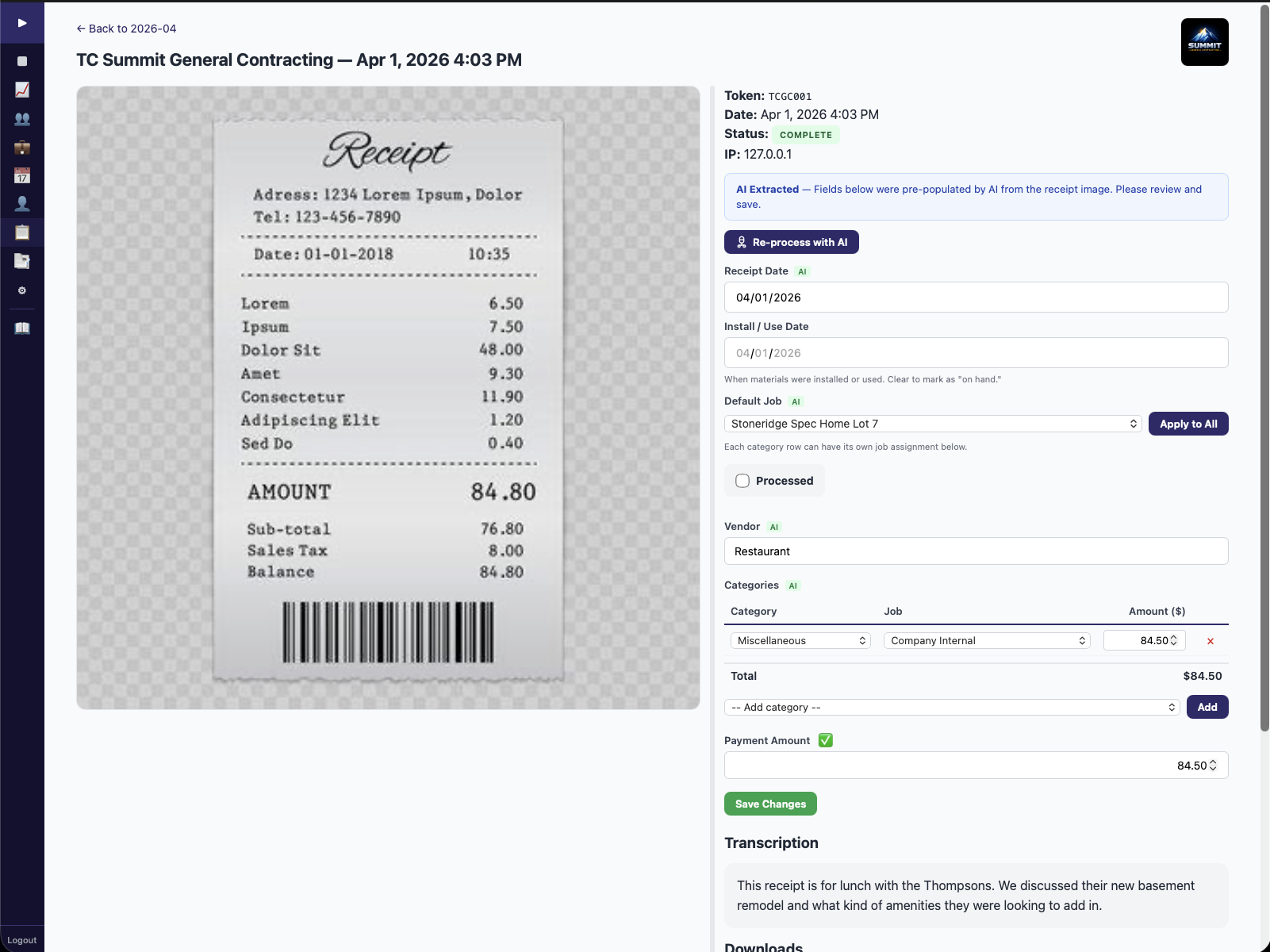
Photo or email a receipt. AI transcribes it, categorizes it, and assigns it to a job. Your bookkeeper reviews it, then pushes it to QuickBooks Online as a Purchase expense — with vendor, account, and category mapping.
The #1 Differentiator: No competitor syncs field-captured expenses to QuickBooks Online with BDB's depth. Jobber and Housecall Pro sync invoices and payments only — zero expense sync.
Every lost receipt is a job cost your bookkeeper never sees. And when your bookkeeper can't see it, your job profitability numbers are wrong.
Here's what that looks like: Your crew buys $300 in materials at Home Depot. The receipt gets crumpled in a truck console. By month-end, you can't match it to a job.
Multiply that by 15 receipts a week across your crew. That's $4,500 per week in expenses your bookkeeper never sees — and it's making your financials unreliable. You think a job made $8,000 in profit, but the real number is $3,500 because half the material costs never made it to the books.
That's not a rounding error. That's the difference between thinking you're profitable and knowing whether you actually are.
Receipt Capture gives your crew three simple ways to capture expenses. AI handles the categorization and job assignment. Your bookkeeper reviews, then pushes to QuickBooks when ready.
Snap a photo of a receipt. Add a voice memo describing the purchase. Or forward an email receipt to your BDB inbox. All three methods work — use whichever is fastest in the moment.
AI reads the receipt, transcribes line items, categorizes the expense type, and assigns it to the correct job. Need to split across multiple jobs? Built in. AI runs locally — no per-transaction API costs.
Your bookkeeper reviews each expense, then pushes it to QuickBooks Online as a Purchase expense with full vendor, account, and category mapping. WIP (Work in Progress) tracking updates as receipts are captured so you see true job costs in real time.
Most field service platforms advertise "QuickBooks integration." But when you look at what actually syncs, the gap is massive — especially for expenses.
| Platform | Invoices/Payments | Expenses to QBO | AI Transcription | WIP Tracking |
|---|---|---|---|---|
| BDB Project Tools | ✓ | ✓ Full | ✓ | ✓ |
| Jobber | ✓ | ✗ | ✗ | ✗ |
| Housecall Pro | ✓ | ✗ | ✗ | ✗ |
| ServiceTitan | ✓ | Limited | ✗ | Limited |
| JobTread | ✓ | Partial (bills) | ✗ | ✓ |
| FieldPulse | ✓ | Partial (POs) | ✗ | ✗ |
Other platforms track expenses in isolation. Receipt Capture connects every dollar spent in the field to a job, a category, and a QuickBooks entry — through a deliberate review-and-sync process.
Whisper and Ollama run on BDB's servers — no data sent to third-party APIs, no per-receipt API costs. The AI reads receipt photos and transcribes voice memos with the same accuracy as cloud services, without the privacy tradeoff.
Forward digital receipts to your BDB inbox. The system captures and processes them — no photo needed. Supplier invoices, online orders, and subscription confirmations all flow into the same pipeline.
Bought materials for three jobs in one Home Depot run? Split the receipt across jobs by line item. Each job gets the correct cost allocation, and each entry syncs to QBO separately.
Work in Progress tracking updates as receipts are captured. You see how much you've spent on a job against the original estimate — before the job is finished, not after the invoice goes out.
Receipts become QBO Purchase expenses with vendor name, expense account, category, and job assignment. Your bookkeeper reviews before sync — no automatic push, no errors hitting your books unreviewed.
Receipt Capture doesn't just take a photo and store it. It creates a complete expense record in QuickBooks Online — with the vendor name, the correct expense account, the category, and the job assignment. Your bookkeeper doesn't have to re-key anything.
This is the pipeline that no other field service platform offers: field-captured receipts becoming QBO Purchase expenses with full mapping — reviewed by your bookkeeper before they hit the books. Combined with Timekeeper's labor data, you get true job-level P&L visibility — materials plus labor, tracked against your original estimate, updated as the work happens.
Receipt Capture turns crumpled truck receipts into clean QuickBooks data — reviewed and ready to push. No more month-end scrambles, no more missing expenses, no more unreliable job costs.
Founder's Pricing: $69/mo for 20 users. Retail $149/mo. All six tools included. Founder's rate locked when you sign up before June 30, 2026.