See Scheduler in Action
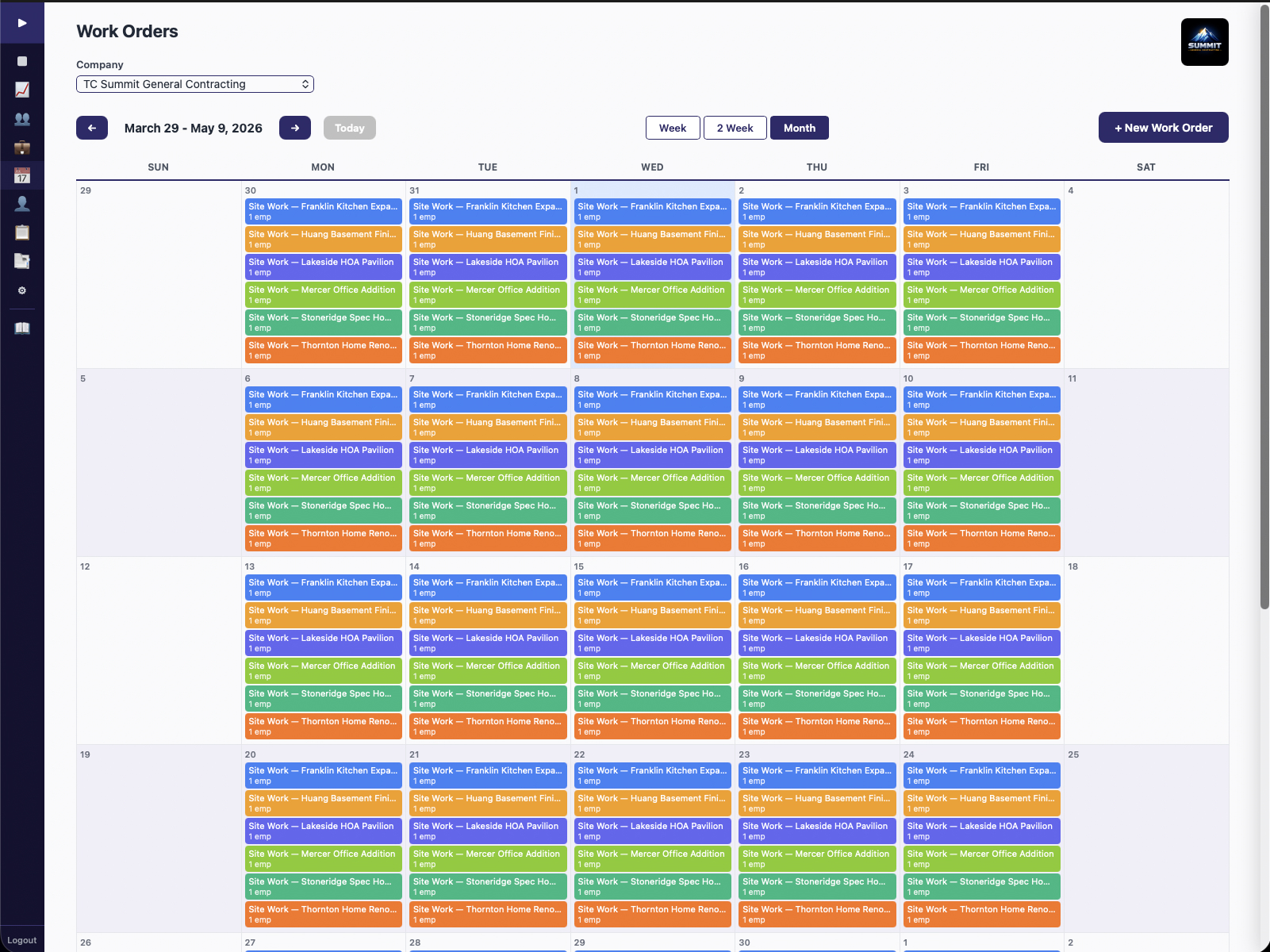
Drag-and-drop scheduling, Work Orders with recurrence patterns, and auto-generated employee schedules. Your crew gets push notifications — no app install needed.
When your schedule lives in a whiteboard, a spreadsheet, or a group text, missed assignments aren't a question of if — they're a question of when.
Here's what that looks like: You're managing schedules in a spreadsheet. A crew member doesn't show up to the right jobsite because nobody updated the text thread. That's a half-day of lost productivity.
Plus an angry client calling to ask where your crew is. And it's not just the one missed assignment — it's the time you spend every morning calling, texting, and coordinating instead of running your business. Recurring jobs are even worse: you're manually re-entering the same schedule every week because your spreadsheet doesn't know how to repeat itself.
Scheduler replaces whiteboards, spreadsheets, and text-thread coordination with a system that generates employee schedules from job assignments automatically.
Create Work Orders with recurrence patterns — weekly, biweekly, monthly, or custom. Assign employees and set the schedule once. For one-off jobs, drag and drop to slot them in.
Based on Work Order assignments, each employee's personal schedule generates automatically. Pause and resume jobs anytime — seasonal jobs, client holds, weather delays — without rebuilding the schedule from scratch.
Your crew sees their schedule on their phone immediately. Push notifications (via Web Push — no app install) remind them of upcoming jobs, schedule changes, and clockout reminders. No morning phone calls.
The schedule isn't just about where your crew goes. It's the backbone that connects time tracking, expenses, and job costing into a complete picture.
Create or drag a Work Order onto the calendar. Assign crew members and set recurrence.
Timekeeper records GPS-verified hours against the scheduled job. Labor costs accumulate in real time.
Labor + materials flow to the CFO Dashboard. You see job profitability before the job is finished.
Most scheduling tools handle one-off dispatches. Scheduler is built around recurring Work Orders — the way most contractors actually run their operations.
Set up a weekly lawn maintenance route, a biweekly cleaning contract, or a monthly inspection — once. The schedule repeats automatically. No manual re-entry every week.
When you assign an employee to a Work Order, their personal schedule updates automatically. They don't need to check a shared spreadsheet — their schedule is always current on their phone.
Web Push via VAPID means your crew gets notifications in their phone browser — upcoming jobs, schedule changes, clockout reminders. No app download, no app store account, no update prompts.
Client on hold? Seasonal slowdown? Weather delay? Pause a recurring job without deleting it. When you're ready, resume it — all history, assignments, and recurrence patterns are preserved.
Not everything is recurring. Drop one-time jobs onto the calendar alongside your recurring Work Orders. Mix and match — Scheduler handles both workflows in one unified view.
Scheduler doesn't just coordinate your crew — it creates the job structure that time tracking and receipt capture attach to. When your crew clocks into a scheduled job and captures receipts against it, that data flows through to job costing and the CFO Dashboard.
The result: your bookkeeper gets clean, job-level financial data without re-keying anything. Scheduled jobs become the organizational backbone that connects labor hours, material costs, and financial reporting into one continuous pipeline.
Scheduler gives you recurring Work Orders, auto-generated employee schedules, and push notifications — all from a phone browser. Included with every BDB Project Tools subscription.
Founder's Pricing: $69/mo for 20 users. Retail $149/mo. All six tools included. Founder's rate locked when you sign up before June 30, 2026.